You post something, check back the next morning, and it's sitting at 300 notes. Is that good?
It depends completely on your blog. For a blog that usually gets 20 notes a post, 300 is a breakout. For a blog that usually gets 3,000, it's a quiet day. The number on its own tells you almost nothing.
This post covers how to tell if a Tumblr post actually overperformed: how to find what "normal" looks like for your blog, why you need to compare posts at the same age, how to tell a real overperformer from a lucky reblog, and what to look at before you try to repeat it.
What "overperformed" really means
A post overperformed when it did clearly better than your typical post. Not better than someone else's blog, not better than some figure you read online, and not better than your single best post ever.
That means you need two things before you can call it:
- A baseline: the note count of a typical post on your blog.
- A fair comparison: the new post measured at a point where it's had the same chance as the posts in your baseline.
Most people skip both. They compare a new post to the last post they remember, or to the viral one from last year, and end up either chasing noise or feeling bad about posts that did fine.
Step 1: Find your baseline
Take your last 20 to 30 original posts. Skip reblogs, because a reblog's note count mostly belongs to whoever posted it first. Skip anything less than a week old for now.
Write down the notes on each one, then take the median: the middle value when you line them all up from lowest to highest.
Use the median rather than the average. An average gets dragged around by one big post. If 29 of your posts got around 100 notes and one got 6,000, your average is roughly 300, which describes none of your actual posts. The median stays near 100, which is what a normal post on your blog really looks like.
If your blog changed a lot recently (you switched topics, or grew fast), use fewer, more recent posts so the baseline reflects the blog you have now.
Step 2: Compare posts at the same age
Notes keep coming in after you post. On most blogs, a post gets the bulk of its notes in the first few days, and then the count slows to a trickle. A post can wake up again months later if a big blog finds it, but that's the exception.
So a six-hour-old post will almost always look worse than your baseline, because your baseline is made of posts that have had a week or more to settle. That's not underperforming. It's just early.
Two ways to handle this:
- Wait a week. The simplest option. Judge every post at around seven days old and you're comparing like with like.
- Build a day-one baseline. If you want an early read, note each post's count after 24 hours as well as after a week. After a few weeks you'll have a median for "notes at one day" and can compare new posts against that instead.
Step 3: Work out the multiple
Divide the post's notes by your baseline median. That gives you a single number you can compare across posts:
Baseline (median of last 30 originals): 120 notes

Post               Age     Notes   Multiple
Sketch Oct 12      7 days    480   4.0x
Comic Oct 15       7 days    150   1.3x
Text post Oct 17   7 days     55   0.5x
Gifset Oct 20      1 day      70   too early
(Example numbers, not real data.)
In Google Sheets or Excel, with notes in column C for rows 2 to 31:
- Baseline:
=MEDIAN(C2:C31) - Multiple for the post in row 2 (with the baseline in F1):
=C2/$F$1
If you'd rather skip the formulas, paste your counts into our free post performance calculator. It works out the median and every post's multiple in your browser.
Rough bands that work as a rule of thumb:
- Under 0.5x: clearly below your normal.
- 0.8x to 1.2x: a normal post. Most of yours will land here, and that's fine.
- 1.5x or more: worth a closer look.
- 3x or more: a clear outlier. Something reached people it doesn't usually reach.
These aren't official thresholds. They're a sensible way to separate a post that did a bit better than usual from one that genuinely broke out. A blog with very spread-out note counts will see more posts at the extremes, so adjust the bands once you know how your own blog behaves.
Step 4: Check how it got there
A high multiple tells you a post did well. It doesn't tell you why, and the why decides whether you can repeat it.
Look at the reblog share. Divide the post's reblogs by its notes (=D2/C2 if reblogs are in column D), and compare that with your usual posts. Since October 2025, Tumblr shows likes, reblogs and comments separately on each post, so this takes a few seconds. A post with lots of likes but an ordinary reblog share mostly pleased your existing followers. A post with a much higher reblog share was spreading.
Open the reblog graph. On the web, open the post's notes and pull up the reblog graph. If most branches start from your blog, your followers carried it. If one big branch starts from another blog, a single reblog from a bigger account did most of the work. That's great, but it's luck you can't schedule. The graph is web-only, and our explainer on the Tumblr Activity page covers what it shows and what it doesn't.
Check your followers. Did you gain more followers than usual in the days after? A post that brings in followers did more for your blog than one that just collected notes. If you're not already tracking this, our guide to tracking Tumblr follower growth shows how.
Step 5: Find what's different, then look for a pattern
Now compare the overperformer to your normal posts. Ask what was different about it:
- Format. Was it an image, a GIF, a text post? Our look at photo vs text posts covers how to compare formats fairly.
- Tags. Which tags were in the first five? Tumblr only indexes those in tag search. Our post on finding the tags that get you notes goes deeper.
- Timing. Did it go up at a different hour or day than usual? See the best time to post on Tumblr.
- Topic. Did it ride a fandom moment, a new episode, a meme that week?
- Effort. Was it a finished piece where your other posts were quick ones?
Then hold off on changing anything until you see the same thing more than once. One post at 4x is a data point. Three or four posts at 2x or more that share a format, a tag, or a topic is a pattern worth acting on.
What not to read into a single post
A few traps to avoid:
- Don't compare yourself to other blogs. A blog with ten times your followers will get ten times your notes on an average day. Your baseline is the only fair comparison.
- Don't treat your best post as the target. If your biggest post ever hit 20x, aiming to repeat it every time guarantees you'll feel like everything is failing.
- Don't panic over one low post. A post at 0.5x happens to every blog. Several in a row, all with something in common, is worth looking at. One isn't.
- Don't forget notes include more than likes. Tumblr's note count adds up likes, reblogs and replies, so two posts with the same total can have done very different things.
Tracking it without the spreadsheet
The manual method works, but it means re-logging note counts as they change and recalculating your baseline every time you post.
Rebloq does this part for you. The posts view lists every synced original post with its notes, likes, reblogs and replies, and puts a multiple next to each one showing how it compares to your average. It's colour-coded using roughly the bands above, so overperformers and quiet posts stand out at a glance, and the counts update every hour.
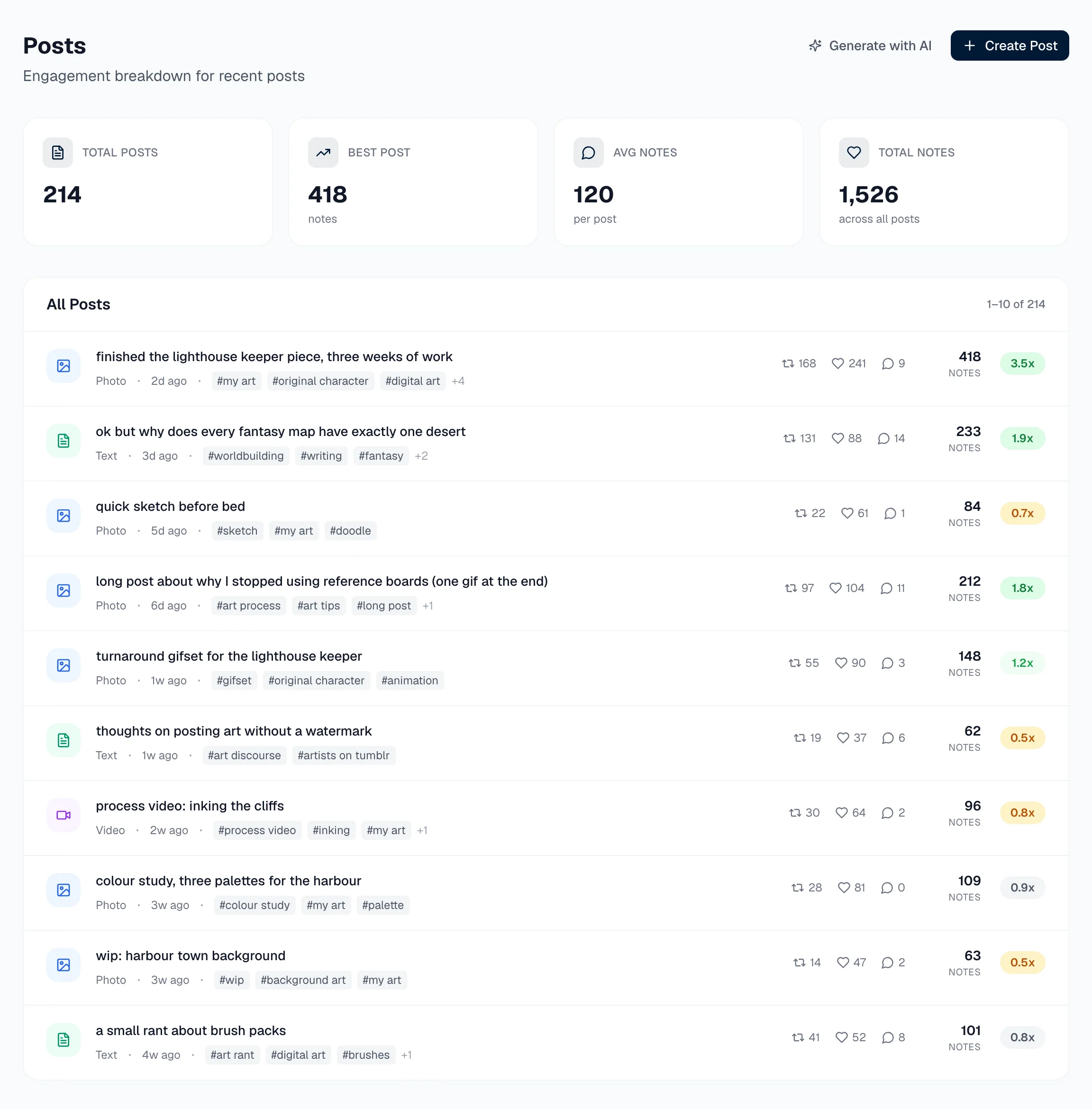
(Example blog and numbers, not real data.)
One thing to know: that multiple uses the plain average of your 50 most recent tracked posts, not the median. On most blogs the two are close. Right after a viral post, though, the average jumps, so your other posts will show slightly lower multiples for a while. If that happens, the median from Step 1 is the fairer baseline.
Quick answers
How many notes is good for a Tumblr post? There's no number that counts as good across Tumblr. 300 notes is a huge post for a blog that usually gets 20 and a quiet one for a blog that usually gets 3,000. Judge a post against your own typical post, not against other blogs.
How do I know if my Tumblr post overperformed? Work out the median notes on your last 20 to 30 original posts, wait until the new post is about a week old, then divide its notes by that median. Around 1x is normal, 1.5x or more is worth a closer look, and 3x or more is a clear outlier.
How long should I wait before judging a Tumblr post? About a week. Most posts get the bulk of their notes in the first few days, so a post that's only a few hours old will look like an underperformer next to older posts that have had time to settle.
Why did one of my Tumblr posts get way more notes than usual? Usually because it reached people beyond your followers, most often through a reblog from a bigger blog or through tag search. Open the post's reblog graph on the web to see whether the reblogs spread from you or from one other blog.
The bottom line
A note count only means something next to your own baseline. Take the median of your last 20 to 30 original posts, compare new posts at the same age, and divide to get a multiple. Anything at 1.5x or more is worth a look, and 3x or more is a real outlier.
Then check how it got there before you try to copy it, and wait for a pattern across several posts before you change what you make.
If you'd rather see every post's multiple without keeping a spreadsheet, Rebloq has a free 7-day trial.