Ask around on Tumblr and you'll hear the same advice: images get notes, text gets scrolled past. Post art, post GIFs, post anything with a picture in it, because a wall of words is dead on arrival.
Then you watch a text post with no image at all hit 40,000 notes, and the advice starts to look shaky.
So do photo posts get more notes than text on Tumblr? This post covers why the photo vs text question has no universal answer, what Tumblr actually means when it calls something a "photo" or "text" post (it's not what most people assume), and a spreadsheet method for finding out which format works on your own blog.
The short answer: it depends on your blog
Any claim that one format wins across all of Tumblr runs into the same problem. Tumblr isn't one audience.
An art blog's followers came for the art, so its text posts are usually a sideline. A writing blog's followers came for the words. A fandom blog might get its biggest posts from jokes typed out in two lines. Text posts are a big part of what Tumblr is known for, and screenshots of them circulate on every other platform, so "text is dead" doesn't survive contact with the site.
The useful question isn't "which format wins on Tumblr?" It's "which format wins for my followers, for the kind of posts I make?" That one you can answer, with about an hour and a spreadsheet.
What Tumblr means by "photo" and "text" posts
Before you compare anything, you need to know how Tumblr labels posts, because it changes the results.
Tumblr's editor builds every post out of blocks: text, images, links, audio, video. The old fixed post types (text, photo, quote, link, chat, audio, video) still exist behind the scenes for compatibility, and Tumblr now works out which one a post belongs to from what's inside it. The Neue Post Format spec gives the order it checks:
1. Ask layout     -> answer
2. Any video      -> video
3. Any image      -> photo
4. Any audio      -> audio
5. Quote text     -> quote
6. Chat text      -> chat
7. A link block   -> link
8. Anything else  -> text
Read that list again, because it has a catch. Any image at all makes a post a photo post. A 600-word essay with a reaction GIF at the end is a photo post. A joke typed out in three lines with a screenshot underneath is a photo post. Only a post with no images, no video and no audio counts as text.
So if you compare Tumblr's "photo" label with its "text" label, you aren't comparing pictures against words. You're comparing "everything with an image somewhere in it" against "pure text". That's why it's worth labelling the posts yourself, which the method below does.
Two smaller points. GIFs count as images, so they land in photo. And answered asks get their own type, whatever's in the answer.
Why a straight photo vs text comparison misleads
Even with honest labels, the raw averages will lie to you if you let them. Four things get in the way.
Effort. Your photo posts might be finished illustrations that took two days, while your text posts are quick thoughts typed on your phone. If the photo posts win, you've learned that finished work beats throwaway posts, not that images beat text.
One viral post. A single post that escaped your followers can pull a format's average up for good. One 20,000-note photo post can make photos look like a winning format when most of your photo posts do worse than your text.
Timing and tags. If all your art goes up on Sunday evening and your text posts go out at 3am, you're partly measuring when you post. Tags work the same way. Our post on finding the Tumblr tags that get you notes warns that tag averages often just track content type, and the reverse is true too.
Likes vs reblogs. A post can rack up likes from people who already follow you and go nowhere else. Reblogs are how a post reaches new people. Two formats with the same note count can be doing very different jobs.
None of this means the comparison is pointless. It means you set it up so these four things can't fool you.
How to compare photo vs text posts on your own blog
Step 1: Pick 30 to 40 of your original posts
Original posts only. A reblog's notes mostly belong to whoever posted it first. Pick posts that are at least a week old, so their note counts have mostly settled, and try to get at least eight of each type you want to compare.
Step 2: Label each post by what it is, not by Tumblr's label
Make your own categories. Keep them about what the reader sees first. A set that works for most blogs:
- Image-led: art, photography, edits, comics. The image is the point.
- GIF: GIFs and gifsets, kept separate because they behave differently from still images on a lot of blogs.
- Pure text: no images at all.
- Text plus image: mostly text, with a reaction image or screenshot as a garnish. Tumblr calls these photo posts. You shouldn't.
- Video, asks and links if you post enough of them to count.
If you make both quick and finished work in the same format, split it (for example "sketch" and "finished art"). That's how you keep effort from posing as format.
Step 3: Log notes and reblogs
One row per post. Since October 2025, Tumblr shows likes, reblogs and comments separately on each post, so take the reblog count while you're there.
Post,Type,Notes,Reblogs
Sketch Sep 2,image-led,212,96
Rant Sep 4,pure text,88,51
Comic Sep 6,image-led,140,44
Joke Sep 7,text plus image,302,188
Gifset Sep 9,gif,75,30
(Example numbers, not real data.)
Step 4: Work out the median and reblog share per type
In Google Sheets or Excel, with types in column B, notes in C and reblogs in D:
- Posts of that type:
=COUNTIF(B:B, "pure text") - Median notes:
=MEDIAN(FILTER(C:C, B:B="pure text")) - Reblog share:
=SUMIF(B:B, "pure text", D:D) / SUMIF(B:B, "pure text", C:C)
Use the median rather than the average. The median is the middle post when you line them up, so one viral hit can't drag it around. If you'd rather not write formulas, a pivot table grouped by type gives you counts and averages in a few clicks (set it to median if you can).
Reblog share is the percentage of a type's notes that are reblogs. A format with a high reblog share is spreading beyond your followers, even if its total notes look ordinary.
Step 5: Read the results with three rules
- Don't trust any type with fewer than eight posts. Call it unknown and keep posting.
- Look for a consistent gap, not a small one. If image-led posts have a median of 140 and pure text has 120, that's noise. If one format's median is double the other, that's worth acting on.
- Compare like with like. If your best "image-led" posts are all finished pieces and your text posts are all quick takes, check the sketch category against the text before calling it a format effect.
What to do with what you find
The spreadsheet shows you what goes with more notes. To find out what causes them, run a small test.
Take an idea you'd normally post one way and post the next few like it in the other format. Turn a short thought into a captioned sketch, or write out a comic's joke as text. Keep posting times and the first five tags as steady as you can. After eight or so of each, recheck the medians.
A few things to keep in mind:
- Change the mix, don't drop a format. A format with lower notes can still be the one your core followers love, or the one that brings in followers. Check your follower growth around the posts that did well before you cut anything.
- Watch reblog share, not just notes. If your text posts get fewer notes but a much higher share of reblogs, they may be the ones reaching new people.
- Recheck every few months. Audiences drift, and what worked for you last spring may not now.
If images do come out ahead, make sure they look right when they land. Our free Tumblr image size guide and GIF size checker cover the dimensions and file limits that stop a post looking blurry or failing to upload.
Tracking it without logging every post
The manual method works, but it takes work. Note counts keep changing after you log them, every new post is another row, and a sample of 40 posts only tells you about those 40.
Rebloq does the logging step for you. Once you connect your blog, the posts view lists every synced original post with its type next to its notes, likes, reblogs and replies, and updates the counts every hour, so you can scan by format without copying numbers out of Tumblr. It shows the single type Tumblr reports for each post, so for posts that mix text and images it's still worth applying your own categories on top.
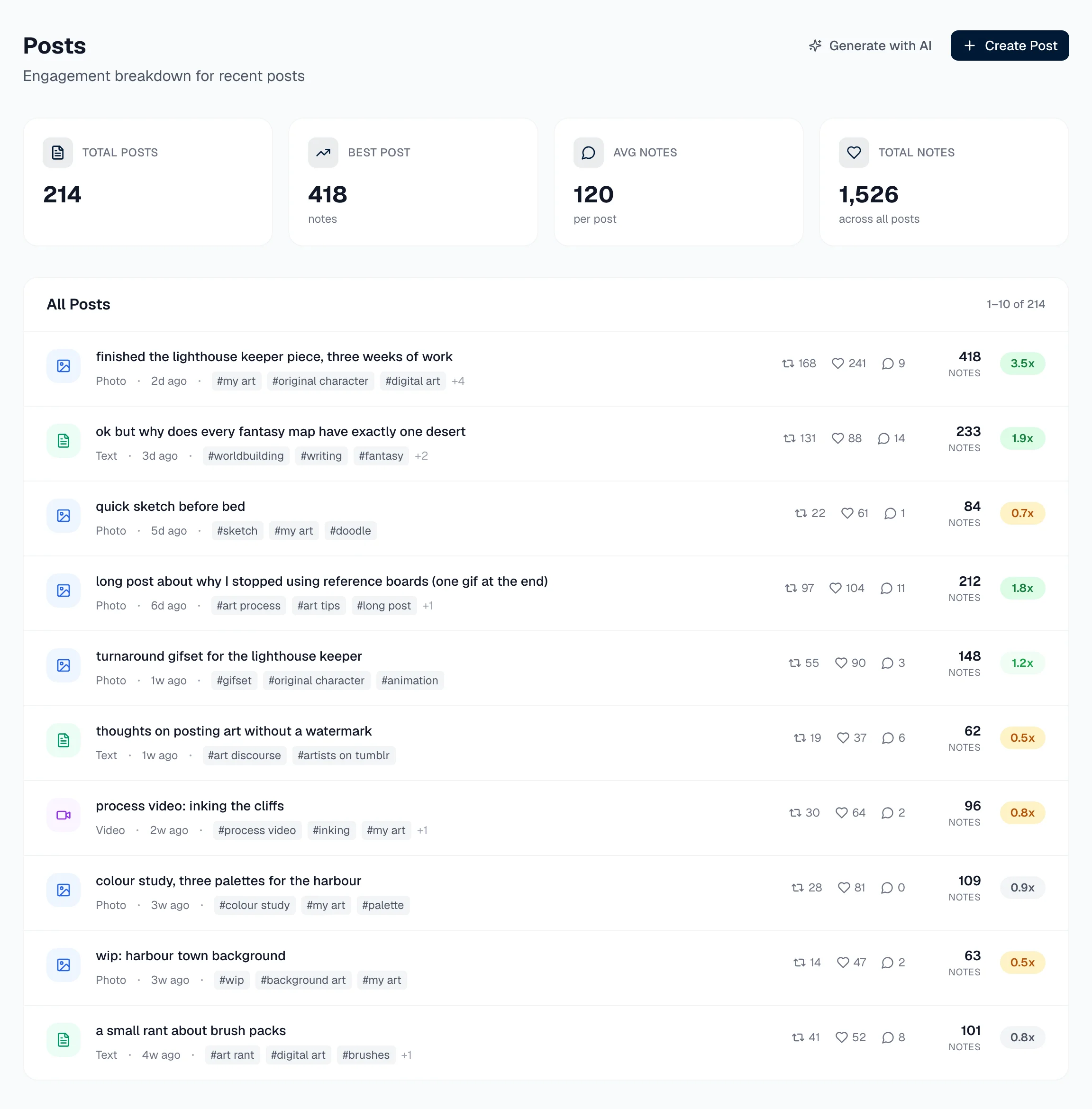
(Example blog and numbers, not real data.)
For a look at what other tools offer, we compared them in the best Tumblr analytics tools.
Quick answers
Do photo posts get more notes than text posts on Tumblr? There's no rule that holds across Tumblr. Some blogs get far more notes on images, others get more on text, and many find the gap is really about effort or topic rather than format. The only answer that counts is the one from your own posts.
Does a GIF count as a photo post on Tumblr? Yes. GIFs are image blocks, and any original post containing an image is labelled a photo post, even if it's mostly text with one reaction GIF at the end.
Are text posts dead on Tumblr? No. Text posts are a big part of what Tumblr is known for, and screenshots of Tumblr text posts circulate all over the internet. Whether they work on your blog depends on your audience, which is why it's worth checking your own numbers.
How many posts do I need to compare post types? Aim for at least eight original posts of each type, all at least a week old. With fewer than that, one lucky post or one quiet day decides the result.
The bottom line
"Photo posts get more notes" is a rule of thumb that some blogs fit and plenty don't. And Tumblr's own labels blur the question, because one image turns any post into a photo post.
Label 30 to 40 of your posts by what they really are, compare medians and reblog share, ignore any type with fewer than eight posts, and test before you change your mix.
If you'd rather see every post's type and engagement in one place without the spreadsheet, Rebloq has a free 7-day trial.